If you are not using a stored procedure for you table adapter, then the answer is DON’T!!
I have done a lot of research and have found no perfect answer. Trying to pass ‘%’ to the fill method or embedding ‘%’ in your custom SELECT SQL statement of your table adapter with or without LTRIM’s and RTRIM’s just doesn’t work right.
The answer I found was to embed the ‘%’ in a stored procedure instead. Here is how:
1) Create a stored procedure. Here is an example:
CREATE PROCEDURE GetCustomers
 @Customer VARCHAR(50)=null
AS
BEGIN
SELECT CustomerID, CompanyName, ContactName, ContactTitle, Address, City, Region, PostalCode, Country, Phone, Fax FROM Customers
WHERE (CustomerID LIKE '%' + @Customer + '%')
END
Note that I embed the ‘%’ in the WHERE clause.
2) When building your table adapter, use your stored procedure to retrieve your data instead of customizing your own SQL statement. Here is an example:
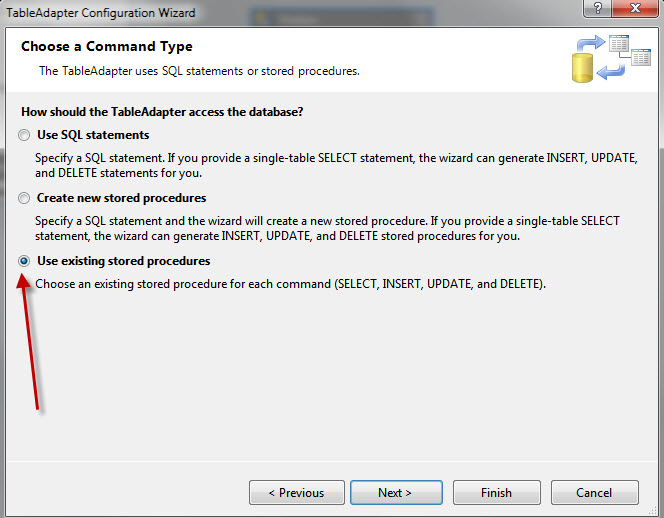
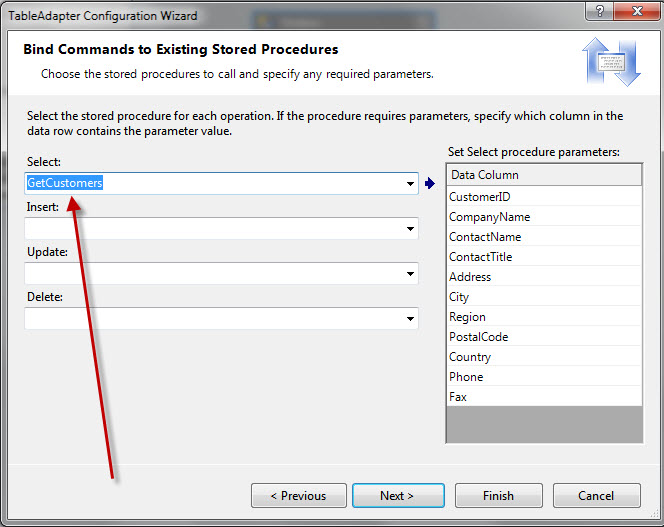
Finally, in your code behind, you just pass the value you are filtering on and let the LIKE ‘%’ wild card in the stored procedure take care of the rest.
Dim custID as String = ‘EA’
customer.Fill(myDataSet.Customers, custId)
Your result set should be all customers that contain the value ‘EA’.
i.e. ‘OCEAN’, ‘BEANS’, ‘JEANS’.