I put together this paddle ball game (break out).
I set the ball speed to .5
I increment the speed by .1 after each level.
I got these results:
- 0.5
- 0.6
- 0.79999999
- 0.89999999
- etc.
What I wanted was:
- 0.5
- 0.6
I put together this paddle ball game (break out).
I set the ball speed to .5
I increment the speed by .1 after each level.
I got these results:
What I wanted was:
Out of the blue, I get this error when trying to launch the Quicktime Player. I tried many solutions from the internet, but to no avail. I found this video that finally showed me how to fix it for me. …
This issue drove me crazy for days. You would think the obvious solution would be to go through the Edit Menu, to Preferences, then Registration and simply remove the name and key. It appears that it is gone until you …
If you compile your game with Flash Player 9 (Publish Settings), this is not an issue. When the Flash Player is set to 10 and above is when propagation occurs.
To prevent this from happening, add the following code…
event.stopPropagation();…
One day, out of the blue, I couldn’t seem to play embedded flash on the web. An error insisted I needed to install the correct version of flash. I proceeded to do so, but the install kept failing. Somehow I …
There is a very simple way to prevent people from seeing your directory listing via the web browser’s address bar. You can prevent it at the root level (www) or inany sub level folder. All you need is a file …
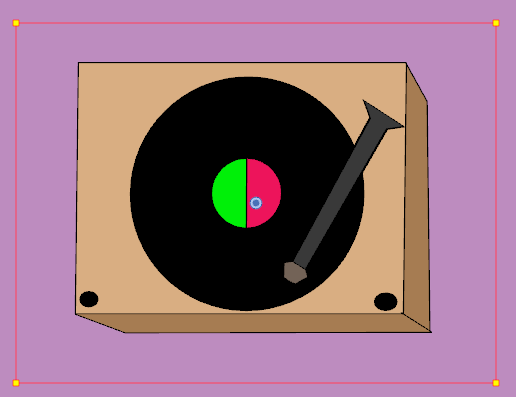
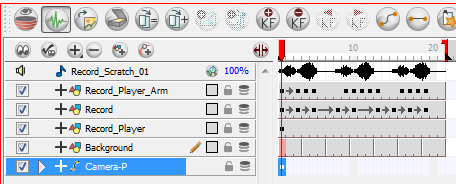
Issue: You have this record player. The record is round and rotates as you designed it. So far so good.
Let’s say you have a string of data from a credit card that you swiped using a credit card swiper device. In the standard formatted string of data that is received into your string variable from the credit card, you …
Other controls such as the combox box, numeric stepper, checkbox, and radio button can be disabled
(shaded light grey and can no longer be interacted with) via the designer or programmatically if desired.
What about the textField? As you can …
You can define what outlook blocks or does not block by using this registry key
[HKEY_CURRENT_USERSoftwareMicrosoftOffice12.0OutlookSecurity]
“Level1Remove”=”.mdb;.zip;.exe;.url;.reg;.app”
Add to “Level1Remove” all extensions you do not want Outlook to block.
See the following article for more detail.
http://support.microsoft.com/kb/829982…