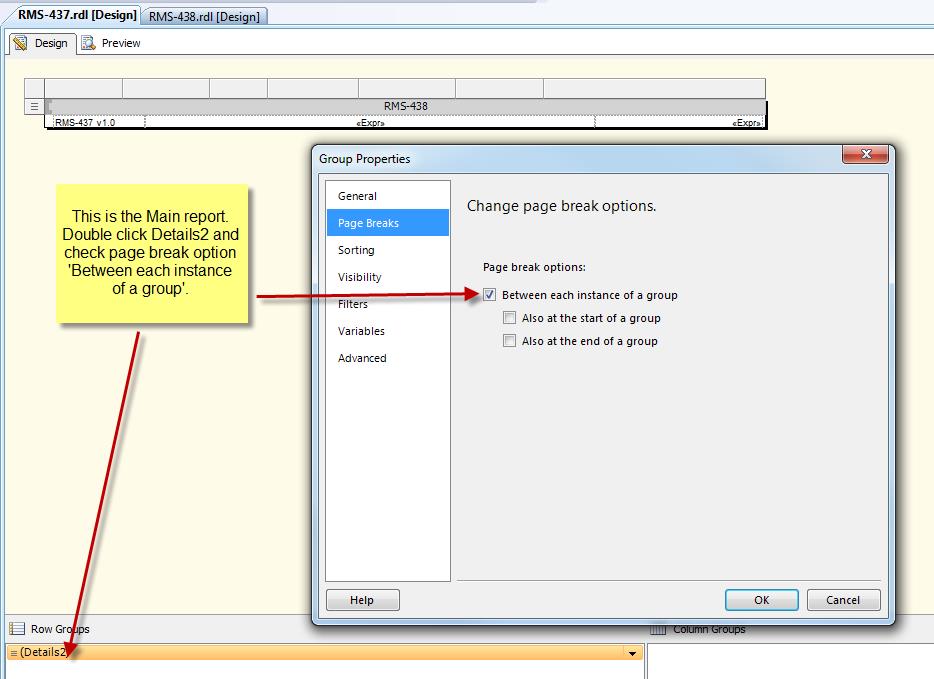
When all else fails, add the page break to the row group of the main report.
 …
…
When all else fails, add the page break to the row group of the main report.
…
The short answer is to pass a string array in the value portion of the parameter object.
First, let’s look at the code in a visual basic forms application that builds the parameter and calls the report.
Let’s say we …
Have you ever witnessed running a report in the Business Intelligence Development Studio only to see data that you know does not exist anymore in your SQL Database?
In certain circumstances, when previewing a report in BIDS, the environment bypasses …
select * from date_range_table
where

((@startdate1 IS NULL AND @enddate1 IS NULL)
OR (start_date1 >= @startdate1 AND start_date1 <= @enddate1)
OR (start_date1 >= @startdate1 AND @enddate1 IS NULL)
OR (@startdate1 IS NULL AND start_date1 <= @enddate1))

AND

((@startdate2 IS NULL
…
=iif(countrows(“dsCarMake”) = Parameters!CarMake.Count, “DO SOMETHING”, “DO SOMETHING ELSE”)
Explanation:
I have a parameter called CarMake. I load this parameter from a dataset called dsCarMake. The parameter is set to allow multiple values.
Let’s say a total of fifty Car Make’s …
Scenario:
You create a report. You have one parameter called ‘CITY’ which contains all valid cities in the state of Florida. This parameter is used to report on all citizens that live in a particular city.
You have two tables.…
There are times when you want to display in a textbox on your report the value of a multi valued parameter. If blank is a valid value for your parameter, you don’t want to display the comma in your textbox …
Let’s say you have a dataset and it read in 15 rows.
There are two columns called, ‘Task’ and ‘Priority’
SELECT Task, Priority FROM *some_table*
Task          Priority
------------------------------

a             1
b             3
c             4
d             1
e             5
f             7
… Let’s say you have an address database table and you define a column for row number such as this:
SELECT ROW_NUMBER() OVER(ORDER BY LName) AS 'RowNumber',*
FROM   NameAndAddressTable
ORDER BY LName, FName
If you want to alternate between LightGrey and …